
Turn any GitHub repository into
actionable development tasks in seconds.
AutoDevs analyzes your codebase, finds issues, generates improvements, and helps you ship faster.
Quick install
Stop memorizing commands.
Run autodev and use the Command Center. Every major capability is discoverable from the same workflow, while the full CLI remains available for scripts and power users.
Install the languages, frameworks and tools your project needs.
Understand dependencies, configuration and environment state.
Find problems and get actionable fixes before they block you.
Use an AI agent that can reason about your workspace and tools.
HOW AUTODEVS WORKS
Turn any codebase into actionable insights and structured developer plans in 4 simple steps.
Install AutoDevs
Install AutoDevs or run it directly using npx on your machine.
Scan Repository
Point it to any codebase to scan dependencies, structure, and configurations.
Get AI Analysis
Receive structured security audits, performance suggestions, and fixes.
Fix Issues Faster
Generate developer plans and apply changes with guided assistance.
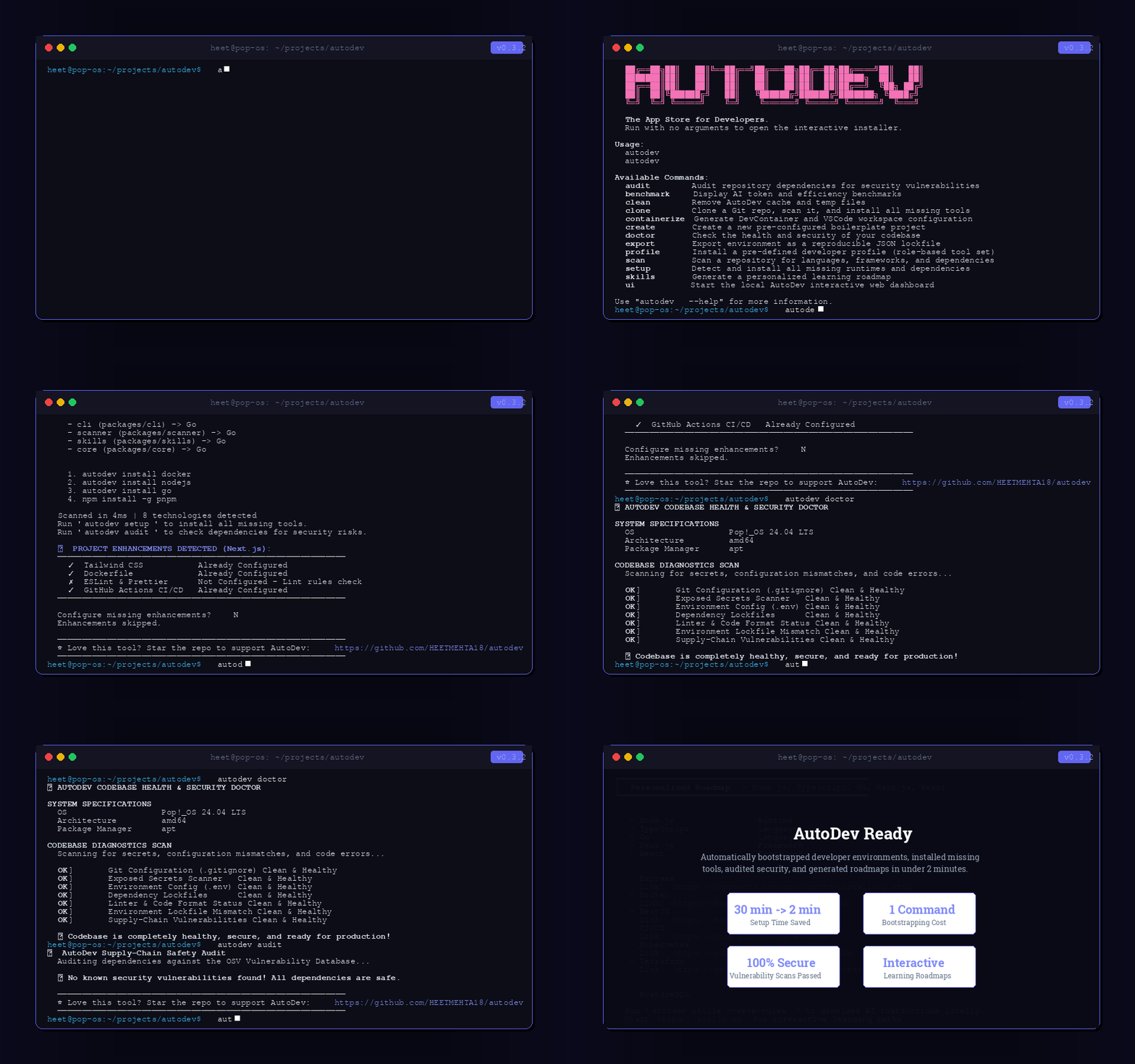
$ npx @heetmehta18/autodev scan
* AutoDevs is like Cursor + GitHub Analysis + AI Project Planning in one developer tool.
SEE A REAL SCAN
Watch AutoDevs analyze a standard React app and transform unstructured code issues into discrete developer tasks.
Generated Plan: my-react-app
Ready to execute · 5/8 critical shown
Waiting for CLI scan to complete...
💡 Compare: AutoDevs is like Cursor + GitHub Analysis + AI Project Planning in one developer tool.
THE TRANSFORMATION
How AutoDevs shifts your development workflow from manual searching to autonomous shipping.
Before & After AutoDevs
- ❌Manual code reviews & tedious spot checks
- ❌Random TODOs scattered and forgotten in files
- ❌Constant context switching to inspect dependencies
- ❌Missing hidden bugs, config leaks, and vulnerabilities
- ✅Structured tasks prepared instantly on commands
- ✅AI recommendations generated from codebase scans
- ✅Faster, focused development pipelines
- ✅Better repositories, cleaner configs, and secure code
Target Audience
- ✅Students building complex projects
- ✅Open source contributors analyzing new repos
- ✅Startup developers moving at lightning speed
- ✅Freelancers handling multiple client codebases
- ✅Engineering teams maintaining codebase health
- ❌Non-technical users who don't run terminals
- ❌No-code builders looking for drag-and-drop
- ❌Teams avoiding AI automation entirely
“AutoDevs is like Cursor + GitHub Analysis + AI Project Planning in one developer tool.”
SEE IT IN ACTION
Run autodev setup in any project and the interactive installer opens.
THE APP STORE
FOR DEVELOPERS.
Select developer tools, databases, and language runtimes. Install them cleanly with a single command on your terminal. Try it live below.
NEOVIM v0.10.0
A hyper-extensible, fast, Lua-configurable terminal text editor. Autodev configures it complete with pre-bundled compilers and LSP servers out of the box.
Python
languagesDynamic, object-oriented programming language.
Node.js
languagesJavaScript runtime built on Chrome's V8 engine.
Go
languagesOpen source programming language developed by Google.
Rust
languagesLanguage empowering everyone to build reliable and efficient software.
PostgreSQL
databasesPowerful, open source object-relational database system.
Redis
databasesIn-memory data structure store used as a database, cache, and message broker.
MongoDB
databasesDocument-based, distributed database designed for modern apps.
Docker CLI
devopsPack, ship and run any application as a lightweight container.
kubectl
devopsCommand line tool for controlling Kubernetes clusters.
Terraform
devopsInfrastructure as Code tool to build, change, and version resources.
Neovim
toolsVim-fork focused on extensibility and usability.
Git
toolsFast, scalable, distributed revision control system.
tmux
toolsTerminal multiplexer enabling multiple windows in one terminal.
Ollama
aimlRun large language models locally on your system.
JupyterLab
aimlWeb-based interactive development environment for notebooks.
Installer CLI Command Builder
Install the selected environment packages on your local machine instantly. Copy the dynamically compiled command below and run it in your terminal.
$ curl -fsSL https://autodevs.dev/install.sh | bash -s -- --install nodejs gitDEVELOPER PROFILES
Pick your role. AutoDev installs everything — with smart dependency resolution.
SCAN ANY GITHUB USER
AutoDev reads all public repos, detects languages, and generates a setup plan.
Or run: autodev github USERNAME
Languages Detected
YOUR LEARNING ROADMAP
AutoDev scans your repositories — git history, package manifests, Dockerfiles, CI configs — and builds a confidence-scored skill matrix with personalized upgrade paths. Powered by skills.sh.
Click Run Demoto see AutoDev's Skills Engine scan a developer's repositories and generate a live skill matrix.
$ CLI Commands
Scan repos and generate your skill matrix
Deep analysis with git history + commit frequency
AI-powered insights via Perplexity API
Export roadmap as Markdown / JSON / HTML
Sync profile to skills.sh
How It Works
Developer learning platform. Create your public skill profile →
DEVELOPER LOVE
Hear from developers, startup founders, and students shipping faster code with AutoDevs.
“I can't imagine setting up a new repository without running a scan now. It finds the missing test coverages, security holes, and tells me exactly what to implement. AutoDevs is like Cursor + GitHub Analysis + AI Project Planning in one developer tool.”
Alex Rivera
Open Source Maintainer
“AutoDevs scans my repository, finds all the deprecated configurations and package issues, and structures them into actionable tasks. Slashed our onboarding time for junior devs by half.”
Sarah Chen
Engineering Lead @ TechFlow
“As a freelancer managing multiple client codebases, autodev is an absolute lifesaver. Perfect for keeping track of all bugs and security issues, estimating the fix times, and getting them solved.”
Marc Dupont
Freelance Fullstack Developer
GET STARTED IN SECONDS
Pick your preferred installation method.
Install globally via npm
Run without local install
Linux & macOS — recommended
macOS & Linux
Windows — add bucket first
No local install required